






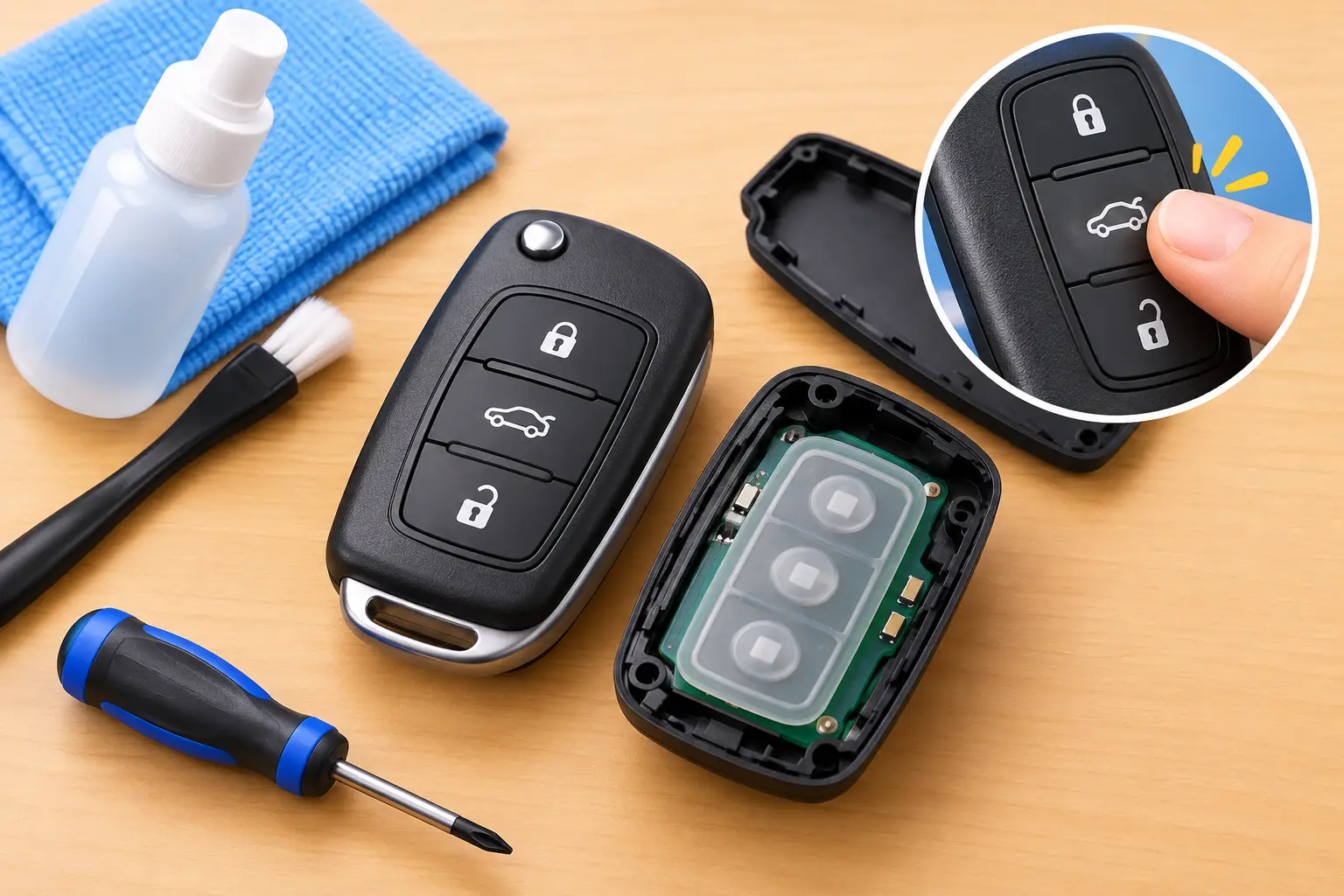
A sticky unlock button is more than a small annoyance when you are carrying groceries, heading to work, or trying to get your family into the car. The good news is that you can often fix sticky key buttons caused by surface grime without replacing the entire remote. The key is knowing when a careful cleanup is safe and when the problem is inside the fob, where a DIY attempt can create a more expensive issue.
Modern vehicle remotes are compact electronic devices. A little residue around the rubber buttons can make them feel slow or stuck, but moisture, damaged button contacts, and cracked circuit boards need a different solution. Start with the least invasive option and stop before you risk the electronics inside.
Why car key fob buttons become sticky
Most sticky buttons come from buildup around the outside of the key fob. Hand lotion, sunscreen, food residue, spilled drinks, dust, and pocket lint can work their way into the small gap around the button. Over time, the rubber or plastic button may no longer spring back as it should.
Heat can contribute, too. A key fob left in a hot car or squeezed in a pocket with other items may develop a button that feels soft, gummy, or uneven. On older remotes, the rubber membrane under the outer button can wear down, tear, or shift out of position.
Not every button problem is actually stickiness. If the button presses normally but the vehicle does not respond, the issue could be a weak battery, a worn internal contact, remote programming, or a problem with the vehicle rather than the fob. Pay attention to the feel of the button before assuming it only needs cleaning.
Check the problem before you clean
Press each button on the remote one at a time. Compare the sticky button with the lock, unlock, trunk, panic, or remote-start buttons. A button that physically catches, stays depressed, or feels noticeably slower than the others likely has debris or a damaged button assembly.
If every button feels normal but none work consistently, replace the battery first if it is due. A fading fob battery can cause weak range, intermittent response, and behavior that looks like a button failure. If only one function fails while the other buttons work, the individual switch or conductive pad may be worn.
Also look for signs of liquid exposure. A key fob that was dropped in a drink, washed in clothing, exposed to heavy rain, or left in a damp bag may have corrosion inside. Do not keep pressing the buttons repeatedly in that case. Moisture and battery power together can damage electronic components quickly.
How to fix sticky key buttons safely
For a button that is physically sticky but the fob has not been soaked or damaged, start by cleaning the exterior. Turn the fob so the buttons face down. This helps loosened debris fall away from the seams instead of deeper into the housing.
Use a dry, soft brush to clean around the edges of the buttons. A clean toothbrush with soft bristles works well, as does a small detailing brush. Brush gently around each seam without forcing the button inward. Compressed air can help remove lint, but use short bursts from a distance. Holding a can too close may push debris farther inside or leave condensation on the remote.
Next, use a microfiber cloth that is barely dampened with 70% isopropyl alcohol. The cloth should not drip. Wipe the button surface and the narrow area around it, then press the button several times with the fob facing downward. This can break up light oils and residue while keeping liquid away from the electronics.
Avoid spraying cleaner directly onto the key fob. Do not use water, glass cleaner, bleach, WD-40, cooking oil, hand sanitizer, or harsh household chemicals. These products can leave residue, damage rubber, discolor plastic, or seep into the circuit board. A cotton swab can be useful around tight edges, but it should be only lightly moistened, never wet.
Let the remote air-dry completely before testing it. Give it at least 15 to 30 minutes in a dry indoor space. Do not use a hair dryer, place it on a heater, or leave it in direct sun. Excessive heat can warp the shell, weaken adhesives, and damage internal components.
When opening the fob makes sense
Some key fobs are designed to open for battery replacement, but that does not mean every remote is easy to repair inside. If cleaning the outside does not restore the button, the problem may be a worn rubber membrane, a broken plastic button cap, or a failed micro-switch on the circuit board.
Opening the fob can be reasonable if you already know how to replace the battery and the remote housing separates cleanly. Work on a clean, dry table and remove the battery before touching the inside. On many Toyota and Lexus smart keys, the emergency key releases first, allowing access to the battery compartment or shell seam.
Once open, inspect for obvious dirt, corrosion, loose pieces, or torn rubber. Do not scrape the metallic contact areas with a knife, screwdriver, or abrasive material. Those contacts are delicate. A damaged contact pad or a lifted switch can turn a repairable remote into a remote that needs replacement and programming.
There is also a security consideration. Modern smart keys and transponder remotes contain electronics tied to your vehicle's immobilizer system. The battery is generally user-serviceable, but damaged electronics may require a replacement fob, key cutting, and programming. The right repair depends on the vehicle's make, model, year, and key type.
Signs you need key fob repair instead of cleaning
Stop trying to clean the remote and arrange professional help if the button remains stuck after a careful exterior cleaning, the fob was exposed to liquid, or the button has separated from the housing. You should also get help if the remote works only when squeezed, has a cracked shell, or has stopped operating after you opened it.
A professional can determine whether the issue is the shell, rubber button pad, battery contacts, circuit board, or programming. Sometimes a replacement key shell solves the problem while preserving the working electronics. In other cases, the remote needs board-level repair or a new programmed key.
This distinction matters because replacing a shell is usually simpler and more affordable than replacing a complete smart key. But putting a damaged circuit board into a new shell will not fix a failed button contact. A correct diagnosis prevents you from spending money on the wrong part.
Protect your replacement remote from future buildup
Once the buttons are working again, keep the fob out of drink holders, damp pockets, and loose bags where it can collect debris. Wipe it occasionally with a dry microfiber cloth, especially after using sunscreen or hand lotion. If you use your vehicle for rideshare work, deliveries, or outdoor jobs, a fitted key fob cover can reduce wear from constant handling.
A loose key ring can also put unnecessary stress on the remote shell. Keep heavy accessories separate from the fob when possible. If the case begins to crack or a button starts feeling soft, address it early instead of waiting until the remote fails at an inconvenient time.
For Toyota, Lexus, and other modern vehicles, a second working key is practical protection as well. If one remote develops a problem, you can still drive, lock, and access your vehicle while the damaged fob is repaired or replaced. Smartkeys can help with fob repair, replacement shells, emergency keys, cutting, and programming when a sticky button turns into a no-start situation.
Your car key should respond the first time you press it. If gentle cleaning does not bring that simple reliability back, protect the remote and have the right repair done before you are locked out or left without a working key.