






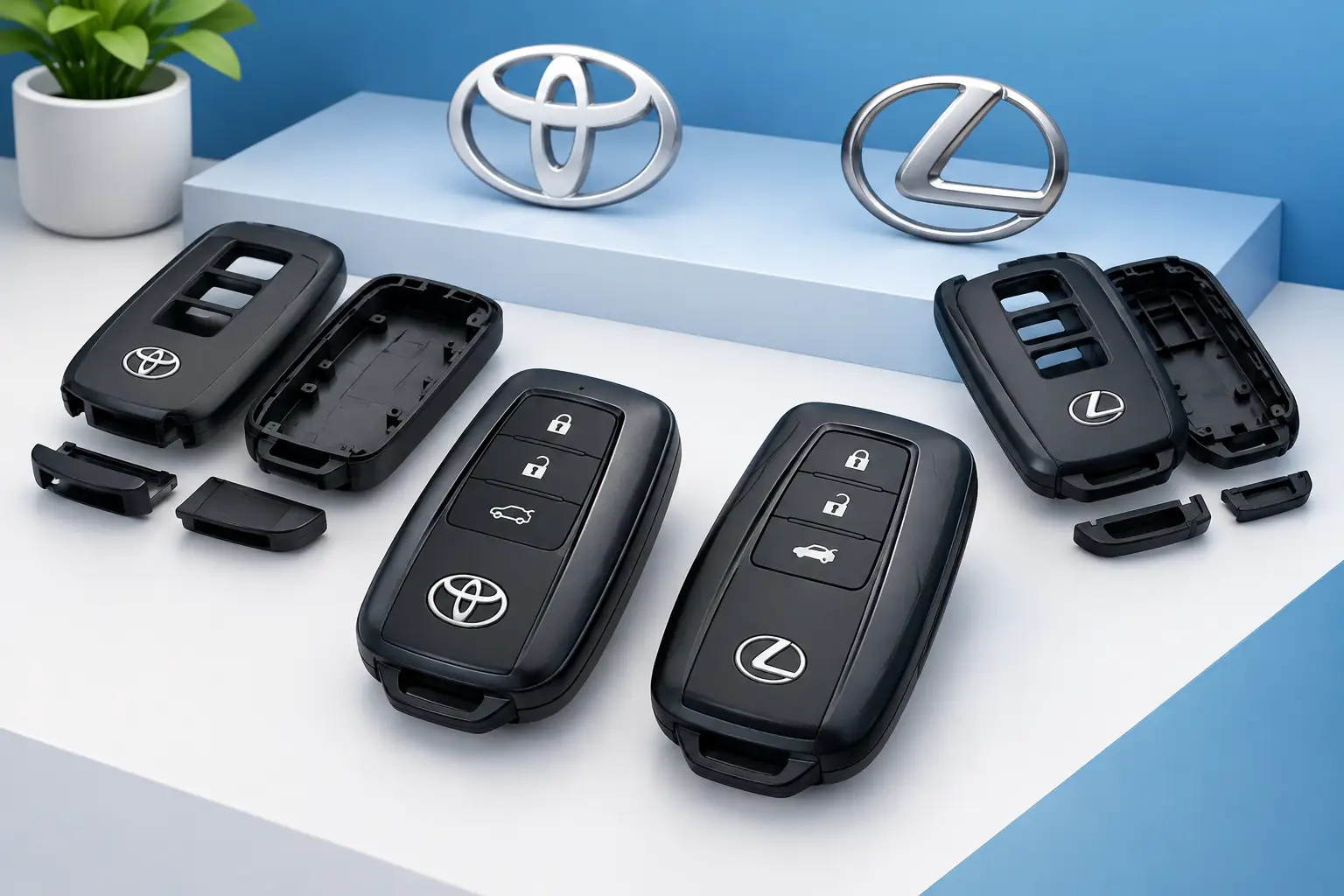
The buttons still work. Your Toyota or Lexus starts normally. But the fob case is cracked, the key ring loop has snapped off, or the battery cover will not stay shut. That is exactly where key shells can save you money and frustration. A replacement shell gives your existing electronic key a new exterior without automatically replacing the working chip, remote board, or vehicle programming.
For many drivers, a shell is the practical fix for a key that looks worn out but still does its job. The catch is that the shell has to match your key, and the electronics inside must be in good condition. Here is how to tell whether a key shell is the right answer before you spend time or money on the wrong repair.
What Key Shells Actually Replace
A key shell is the outer housing of a vehicle key or smart fob. Depending on the design, it may include the button pad, battery cover, key ring loop, emergency-key compartment, and a blank or uncut emergency blade. It usually does not include the circuit board, immobilizer transponder, battery, or pre-programmed electronics that communicate with your vehicle.
That distinction matters. Your vehicle recognizes the electronics inside your current fob, not the plastic shell around them. If your original circuit board and transponder are moved into a compatible replacement shell, the car will generally continue to recognize the key without new programming.
A shell repair is often a good option when the case is split, the buttons are worn through, the key ring loop is damaged, or the fob feels loose after years of daily use. It can also be useful when a remote has been repaired but its original housing no longer holds the parts securely.
Signs a Replacement Key Shell May Be Enough
Start by checking how the key performs before you take it apart. If lock, unlock, panic, and trunk functions work consistently, and the vehicle starts or detects the smart key normally, the electronics may be fine. A damaged exterior is then the likely problem.
A shell is especially worth considering when the battery door keeps popping open, the rubber buttons have peeled away, or the plastic near the key ring has cracked. These are common wear points, particularly for keys that live on a crowded keychain, get dropped on pavement, or spend time in a pocket with coins and tools.
It depends on the damage, though. A key that works only when held a certain way, fails after rain, has unresponsive buttons, or displays an intermittent “Key Not Detected” warning may have more than a cosmetic problem. Rehousing a failing circuit board will not repair it.
Matching Key Shells to Your Vehicle
The right shell is not chosen by vehicle brand alone. Toyota and Lexus have used several smart key and remote fob designs, sometimes across the same model line and model year. Two fobs can look nearly identical while having different button layouts, board shapes, emergency-key slots, or internal retaining clips.
Before ordering, compare the original fob carefully. Look at the number and position of buttons, the shape of the case, the battery type and placement, and the emergency key style. If your key has a part number on the back, inside the battery compartment, or on the circuit board, record it. That information helps prevent a shell that looks right online but cannot hold your original components correctly.
Also check whether your key is a traditional remote-head key or a proximity smart key. A remote-head key has a physical metal blade attached to the electronic head. A smart key usually has a hidden emergency blade that slides out of the fob. The shell and blade setup for these two types are different.
For a smart key, the emergency blade is more than a backup accessory. It may be the only way to unlock the driver door if the fob battery dies. Make sure the replacement shell accepts your existing blade or includes the correct blank blade for cutting.
Moving Your Electronics Into a New Shell
Replacing a shell can be straightforward, but the small parts inside deserve care. Work on a clean, well-lit surface and keep the old and new shells side by side. Take a quick photo before moving anything. That simple step makes it easier to confirm the battery contacts, rubber button pad, circuit board, and emergency blade are all positioned correctly.
Protect the circuit board and transponder
Open the old fob gently. Do not force a screwdriver into the case near the circuit board, and do not bend the battery contacts. Static discharge, cracked solder points, and damaged button switches can turn a cosmetic project into a key failure.
Some keys contain a separate transponder chip in addition to the remote board. It may be a small glass or black capsule hidden in the plastic head. If that chip stays behind, the vehicle may crank but not start, even if the remote buttons work. On other keys, the immobilizer electronics are integrated into the circuit board. The design depends on the key style and vehicle.
Transfer every original electronic component that belongs in the new shell. Then install a good battery, close the housing completely, and test every function near the vehicle. Check lock, unlock, panic, trunk or liftgate release, remote start if equipped, proximity entry, and engine start. Test the emergency blade in the door lock as well.
Do not assume a new blade is ready to use
If the new shell includes a blank emergency key, it still needs to be cut to match your vehicle. A blank blade may slide into the fob perfectly while being useless in the door lock. If your old blade is intact and compatible with the new shell, transferring it is often the easiest route.
If the blade is broken, missing, or the shell requires a different blade profile, cutting may be needed. An automotive locksmith can identify the correct blade, cut it accurately, and make sure it works before you need it in an emergency.
When a Shell Is Not the Right Fix
A key shell cannot replace lost programming or repair failed electronics. If your fob has been through water, has no response after a fresh battery, or only works intermittently, it may need electronic repair or a complete replacement key. Likewise, if the car no longer recognizes the key, the issue could involve the transponder, smart key antenna, immobilizer system, or programming.
A shell also will not help if you have lost every working key. In that situation, your vehicle needs a new compatible key, proper cutting when applicable, and programming to the vehicle’s immobilizer or smart key system. That is specialized work, especially on late-model Toyota and Lexus vehicles with advanced security systems.
Be careful with heavily damaged keys. If a circuit board is loose inside a cracked fob, the board may already have suffered impact damage. Test the key before buying a shell so you know whether you are restoring a working key or trying to disguise a deeper problem.
Toyota and Lexus Key Shell Considerations
Toyota and Lexus keys are built for daily use, but the shell is still a wear item. Smart keys with recessed buttons can collect debris, and remote-head keys often break around the blade pivot or key ring. Replacing the housing early can protect the internal board from moisture and keep the battery securely connected.
For Lexus and Toyota owners, correct fit matters because the key’s electronics, blade, and internal clips need to sit precisely in the new housing. A loose board can cause weak button contact. A poor-fitting battery cover can create intermittent power loss. And an emergency blade that is not cut or seated properly may leave you without a mechanical backup.
If you are unsure whether you need a shell, a repaired fob, or a fully programmed replacement, Smartkeys can help identify the practical option based on your vehicle make, model, year, and the way the key is failing.
A cracked key does not have to become a stranded-driver problem. Handle the repair while your original fob still works, keep the emergency blade tested, and you will have a much better chance of avoiding an urgent key replacement later.